
Workbench + Xero integration
Your project view and your books agree
For civil and trade contractors across Australia and New Zealand. Run the job in Workbench, keep the books in Xero, and nobody enters the same cost twice.

Our timesheets are entered directly into Workbench, which captures all of the labour costs directly against the project. We then use Xero as our payroll system, and Workbench is able to export that data directly across to reduce double handling and create efficiencies.

Fiona Zacharias, Finance Manager, Multiworks
What moves between Workbench and Xero
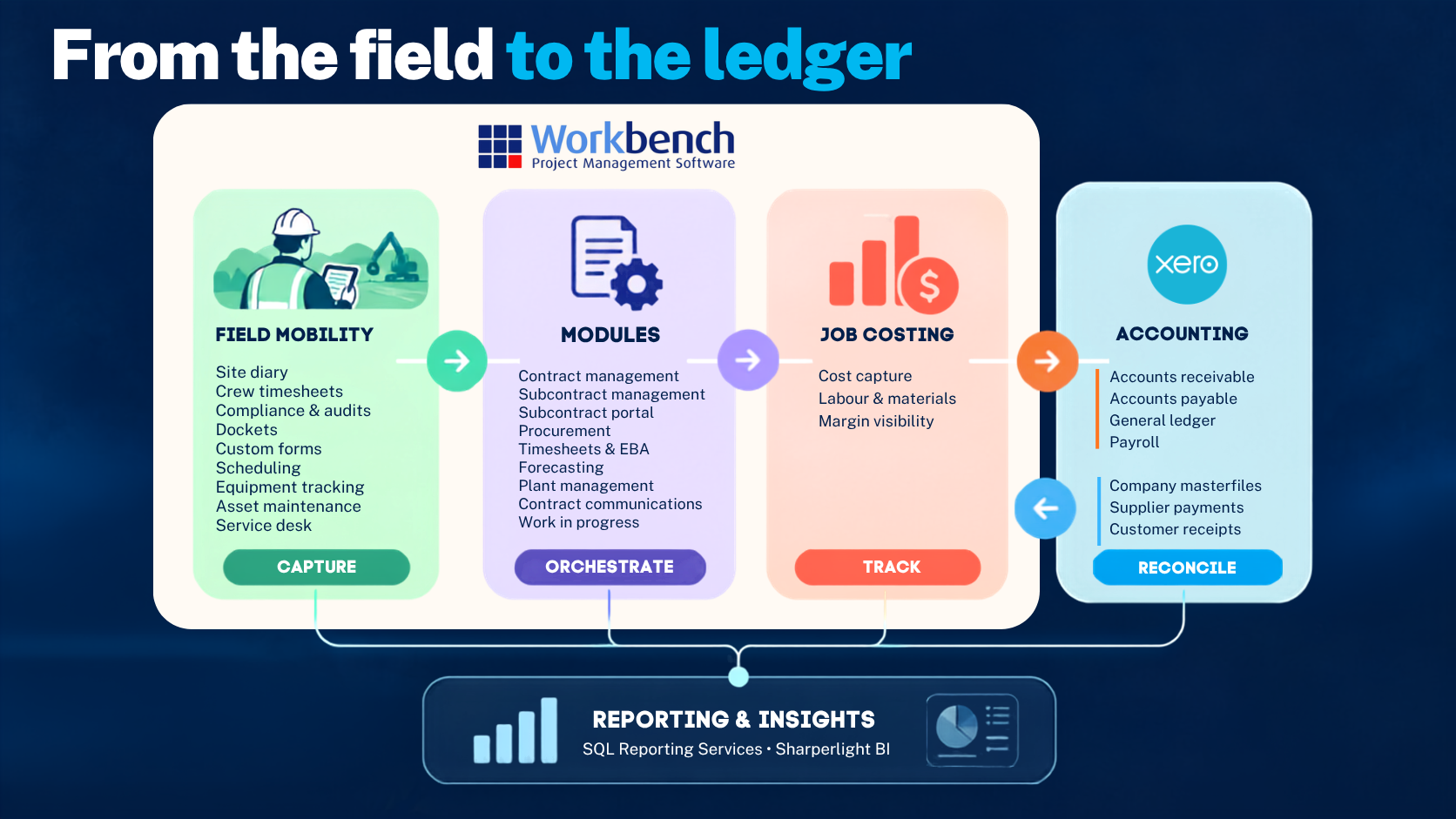
Workbench is where your project lives. Xero is where the money lives. Together they replace the spreadsheet that carries the gap between them.
Code a cost once, and month end already has it
Supplier invoices, progress claims and journals reach Xero already coded to the job and the account. Nobody re-enters a docket at month end, and nobody works out afterwards which job it was for.
Open a job and the numbers are already up to date
When a payment is recorded in Xero, it comes back onto the job by itself. You can open a project and see what it has actually cost, without asking anyone to run an export first. Tracking categories and credit notes travel both ways too, so neither system drifts from the other.
One timesheet does the job cost and the pay run
Crew hours go into Workbench once, against the project they were worked on. Award and EBA interpretation is applied in Workbench, so the hours reach Xero Payroll ready to process. Your labour cost lands on the job at the same time it goes to payroll.
What syncs, and which way
| Record | Direction |
|---|---|
| Invoices | Workbench ↔ Xero |
| Credit notes | Workbench ↔ Xero |
| Tracking categories | Workbench ↔ Xero |
| Timesheets | Workbench → Xero |
| Manual journals | Workbench → Xero |
| Payments | Xero → Workbench |
| Accounts | Xero → Workbench |
| Tax rates | Xero → Workbench |
| Pay items | Xero → Workbench |
| Currencies | Xero → Workbench |
| Contacts | Xero → Workbench |
Operations get the detail. Finance keeps the GL.
Workbench maps many cost codes to one account in your chart of accounts, so you can track a job at the level of detail it needs, without opening a new Xero account every time.
Every transaction Workbench sends to Xero is coded to a job through a work breakdown structure that rolls up to the chart of accounts you already run, so none of it arrives in Xero waiting to be coded. Add a cost code whenever a project needs one. The job carries the detail, and your GL stays exactly as clean as Finance built it.
Cost codes in Workbench
- Site establishment
- Bulk earthworks
- Drainage
- Pavement
- Traffic management
Your Xero chart of accounts
Operations gets the granularity to run the job. Finance keeps the structure it already trusts.
What you can count on
Nobody sits between your job costs and your ledger
Workbench builds and maintains this connection itself, and has been a listed Xero app since May 2021. When something needs fixing, there is nobody in the middle to chase.
No integration project to run
You don't need a developer, a middleware tool or an internal IT project to connect the two systems.
It uses the Xero organisation you already have
Accounts, tax rates, contacts and currencies come across from Xero, so Workbench codes to the chart of accounts you already keep.
How you get connected
-
Request a demo
You see Workbench running on a sample dataset, and we talk through how it would fit your projects and your crews.
-
Get a quote
We price it around your project mix, crew size and contract types. You see the number before anything gets set up.
-
We do the setup
You don't do this part. A Workbench specialist sets up your project templates, plant register, payroll rules including EBA and award interpretation, and the Xero connection.
-
Go live
Crews capture timesheets and dockets on the mobile app. Office staff approve, raise claims, and the costs reach Xero without anyone exporting anything.
Questions about Workbench and Xero
Does Workbench replace Xero?
No. Xero stays your accounting system. Workbench runs the project side and posts to Xero, so month end happens where it always has.
Does the sync go both ways?
Yes. Invoices, credit notes and tracking categories move in both directions, and a payment recorded in Xero comes back onto the job.
Will a detailed cost code structure clutter my chart of accounts?
No. Cost codes map many to one to your GL accounts, so you can add a cost code in Workbench without adding an account in Xero.
Can we keep running payroll in Xero?
Yes. Timesheets export from Workbench to Xero Payroll, and pay items come across from Xero so the codes match on both sides.
Does it work in both Australia and New Zealand?
Yes. Workbench is listed on the Xero App Store for Australia and New Zealand, and tax rates and currencies come from your Xero organisation.
What happens to purchase orders and committed cost?
Purchase orders stay in Workbench, where cost sits against the job from the moment the order is raised. Xero sees the supplier invoice when it arrives.
New to Workbench?
See Workbench running on a sample dataset, and ask what connecting it to Xero would involve.
Request a DemoAlready using Workbench?
Talk to support about turning the Xero connection on, or about changing how your cost codes map.
Contact support