
Skip to content

Workbench vs Procore

Know your true project cost, while the job is still running

If you subcontract the work out, Procore is built to coordinate it. If your own crews do it, Workbench is built for you.
Workbench compared with Procore, and a site supervisor reviewing job cost on a tablet

Over 400 businesses across Australia and New Zealand have chosen Workbench.

  • Freyssinet
  • Lucas Total Contract Solutions
  • McConnell Dowell
  • North East Civil Construction
  • Brockman Engineering
  • Tankweld Engineering

Which one should you run?

Choose Procore

Most of the value on your jobs is delivered by subcontractors, or the job runs on drawings, RFIs and document control.

Choose Workbench

Your own crews do most of the work, you need each job's margin while the job is still running, and timesheets, plant, purchasing and health and safety currently sit in separate systems.

Run both

Procore is mandated on a contract and you still need your own view of what the job cost you. Keep Procore as the record with the head contractor. Run the job's cost, hours, plant, purchasing and payroll in Workbench.

The same job, two ways to run it

How most civil and trade contractors run cost, plant, contracts and payroll today, and what changes on Workbench.

With a spreadsheet

  1. Job cost kept in a spreadsheet and updated by hand
  2. Plant hours on dockets, costed to the job later
  3. Variations and claims tracked in their own files
  4. Timesheets entered a second time for payroll

With Workbench

  1. A real-time view of job cost, by stage, as the work happens
  2. Plant hours and hire costed to the job as they are used
  3. Contract value, variations and claims all against the job
  4. Timesheets exported to payroll, with rates, allowances and Australian award interpretation applied

Request Demo

After months of research, looking for a Project Management system we found Workbench. We knew we wanted a system capable of more than just tracking costs. From consultation, through implementation and support, our experience has been professional and seamless. We now have a single source of truth system which captures our job costing (and more) and translates it into real and meaningful data.

Kayla Steen Commercial Manager, TRM Fencing

Request Demo

How Procore and Workbench compare

Job Procore Workbench
Project cost and forecasting
Budget and variation Yes Yes
Cost to complete and forecast final cost Yes Yes, by stage, with movement
Procurement and materials
Bills data extraction Not covered Yes
Supplier catalogues Not covered Yes
Stock and inventory Not covered Yes
Payroll and compliance
Timesheets with award interpretation (Australia) Not covered Yes
Leave management Not covered Yes
Documents and communication
Site communication and audit trail Yes Partial
Estimating and takeoffs Yes Estimating only
Drawings, RFIs and submittals Yes, built for this Not covered
Show the full comparison
Job Procore Workbench
Project cost and forecasting
Budgeting and cost planning Yes Yes
Committed cost and purchase orders Yes Yes
Progress claims and payment certificates Yes Yes
Variations Yes Yes, tracked separately
Retentions Yes Yes
Overhead cost with no job attached Not covered Yes
Labour and plant
Timesheets against a project Yes Yes
Plant and equipment Yes Yes
Dockets and day sheets Partial Yes
Site diaries and forms Yes Yes
Leave, feeding the resource schedule Not covered Yes

Procore entries come from Procore's own published product pages. Tell us on the call if we have a row wrong.

Know where each job stands before month end

  1. See how each part of the job is tracking

    Budget, cost so far and what is left, stage by stage, so a blowout shows while you can still act.
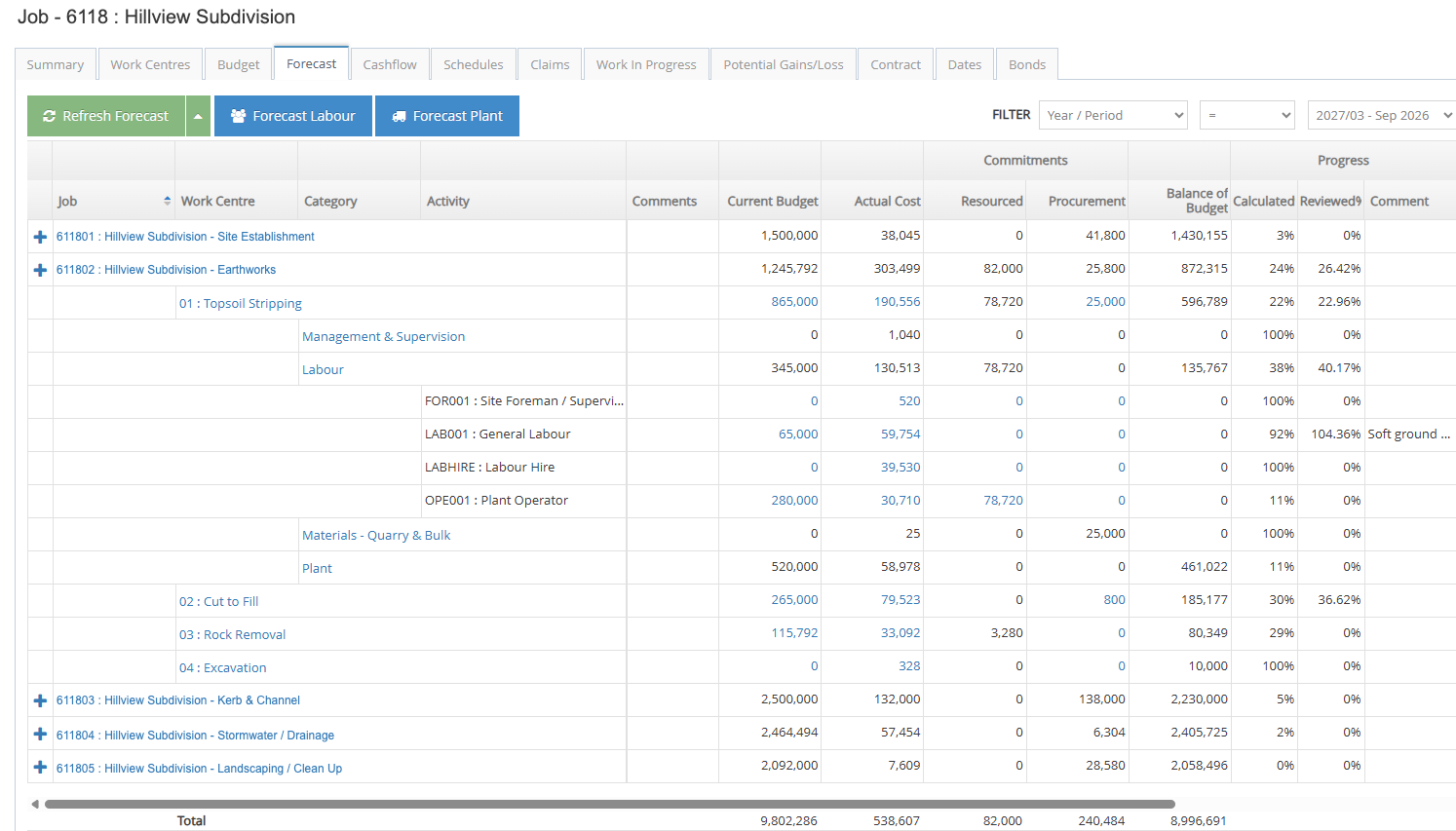
    Workbench job forecast on sample data, showing budget, cost to date and balance of budget for each work centre and activity on a job
  2. Know who and what is on each job

    Book your crews and plant, and see the budgeted, actual and remaining hours for the job beside every booking.
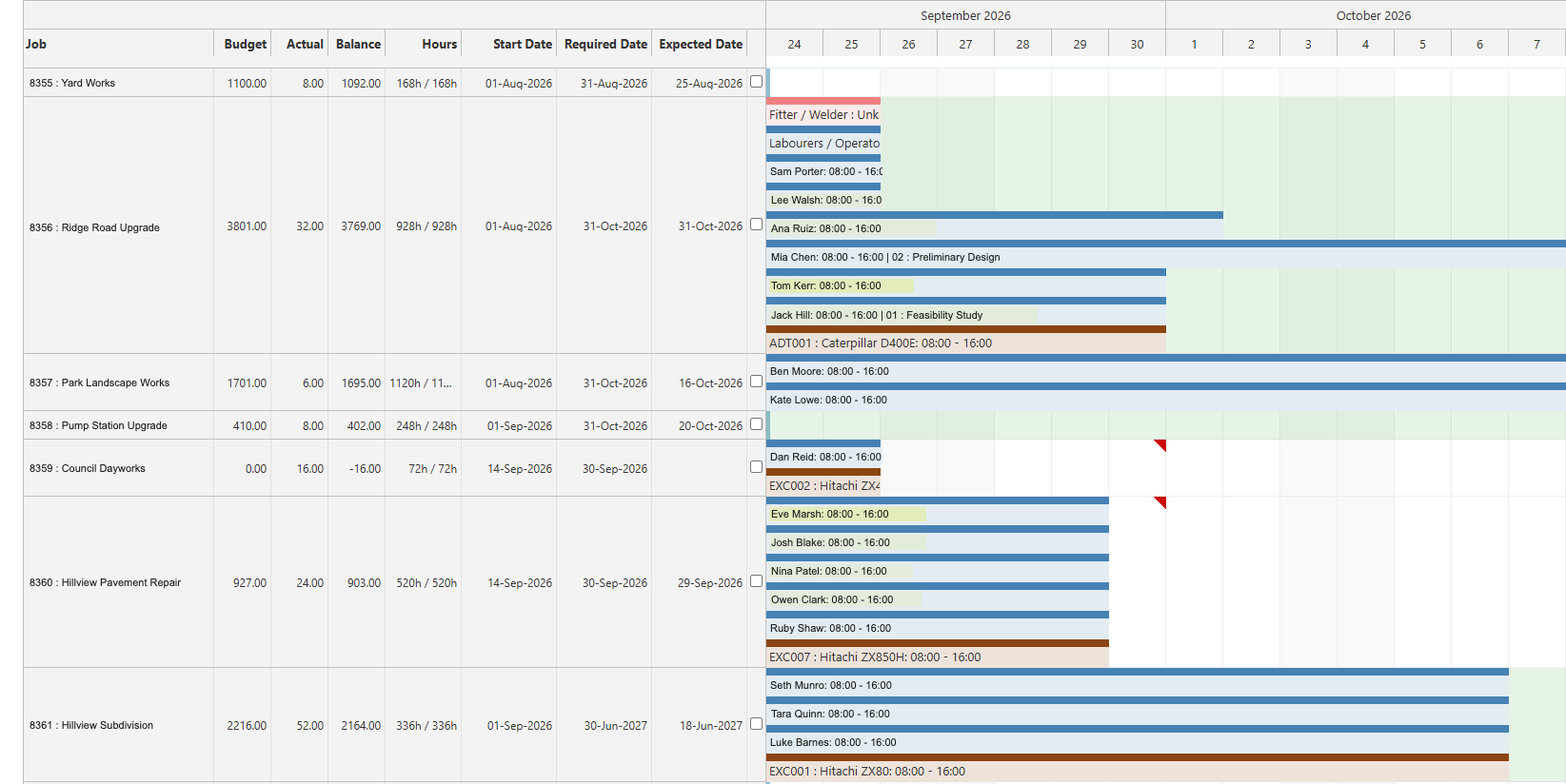
    Workbench job scheduler on sample data, showing crews and plant booked against jobs, with budget, actual and remaining hours beside each job
  3. See where the hours went

    The timesheets your crews enter add up by activity and type of job on their own, so nobody totals hours in a spreadsheet.
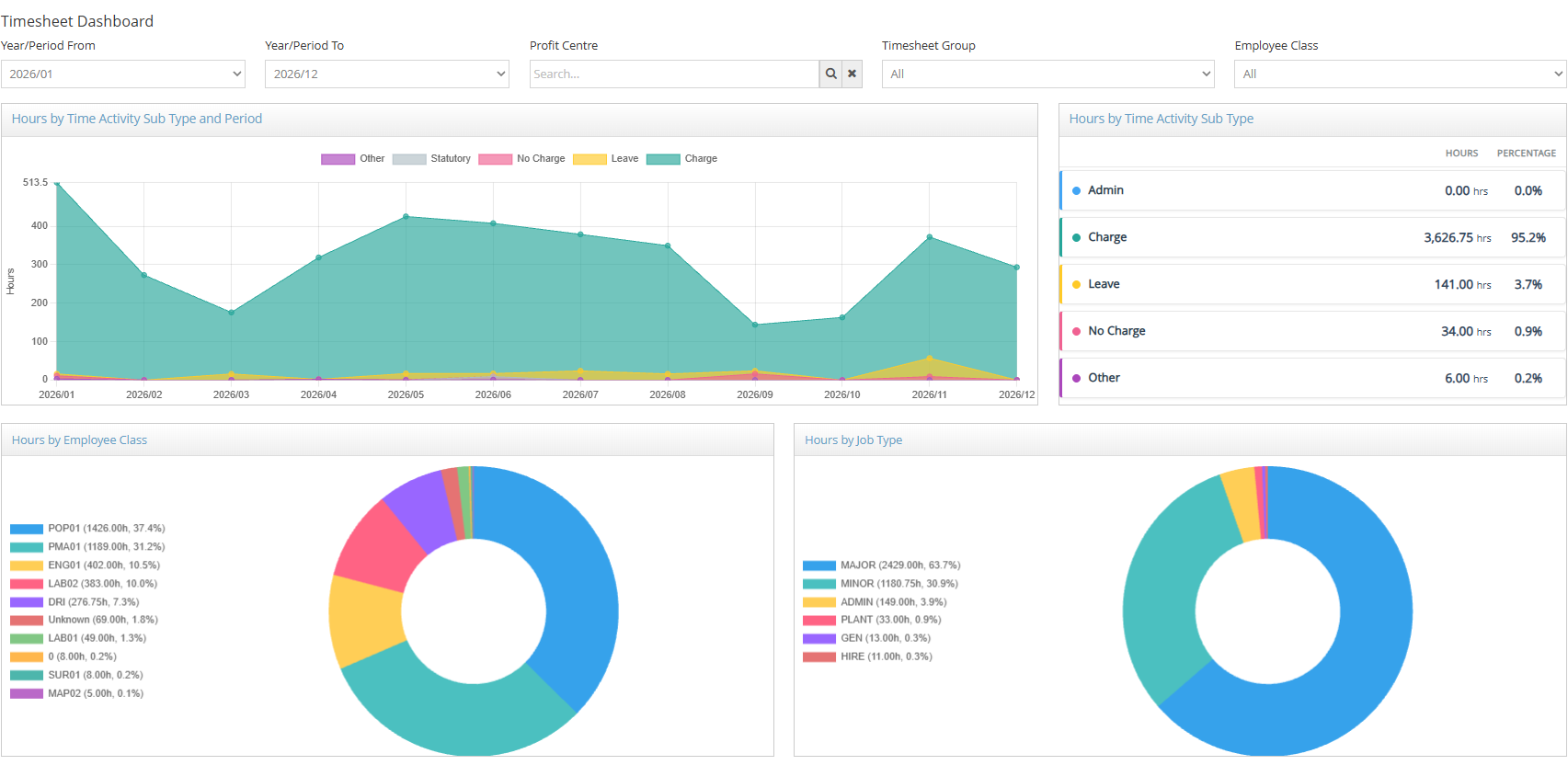
    Workbench timesheet dashboard on sample data, showing hours by activity, employee class and job type

Request Demo

Workbench sits alongside the finance system you already run.

Xero MYOB SAP Microsoft Sage

Questions buyers ask about Workbench and Procore

Can Workbench and Procore run together?

Yes, and some customers do. Procore coordinates the job and the people on it. Workbench runs the cost, labour, plant and payroll behind it. If your head contractor mandates Procore, you can still run your own costing in Workbench and keep each doing what it is good at.

Do we have to move off Xero or MYOB?

No. Workbench sits alongside the finance system you already run: Xero, MYOB Exo, MYOB Acumatica, Sage Intacct, SAP Business One or Microsoft Business Central. Cost data moves across without being entered again, so your finance team keeps the system they already know.

Is Workbench only for large contractors?

No. Workbench Standard is built for self-perform civil and trade contractors, and Workbench Lite is for contractors running projects across spreadsheets and three or four separate subscriptions. Both share one codebase, so moving up needs no re-implementation.

How long does implementation take?

Timelines depend on your requirements: project complexity, integrations and team size all play a part. Tell us how you run your jobs and we'll give you a realistic timeframe on the call.

Does Workbench do estimating?

Yes, Workbench does estimating. It does not do takeoffs, and it integrates with Benchmark Estimating if you already use it. If takeoffs are what you are buying for, Procore is likely the better match.

Does Workbench do document control the way Procore does?

No. Workbench does one thing well: construction operations and project cost for self-perform civil and trade contractors. We don't try to do everything.

See how a job runs in Workbench

We run Workbench on a sample job built from over 30 years working with civil and trade contractors.

Request Demo